Features
Everything you need to manage samples, edit sequences, perform live, and monitor MIDI — all in one native macOS app.
Sample Manager
Full control over all 200 sample slots on your Volca Sample 2 — fetch, send, preview, and organize your entire sample library.
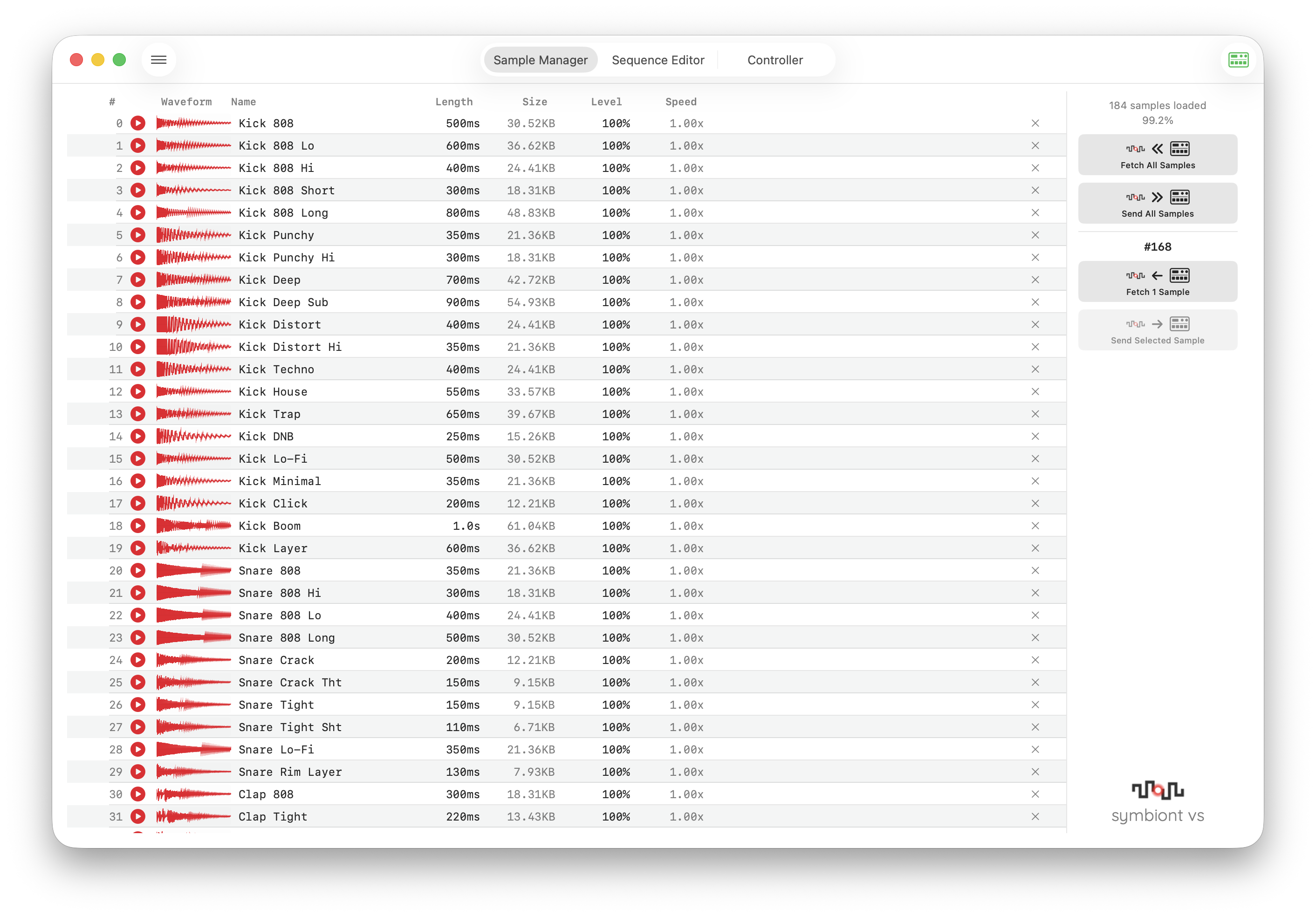
- 200 sample slots with header info display (name, length)
- Fetch All / Send All for bulk transfer, plus individual fetch & send per slot
- Waveform preview and playback directly in the app
- Drag & drop audio file import — drop files straight into sample slots
- Cut / Copy / Paste / Delete operations for rearranging samples
- Memory usage display showing percentage of the 8 MB capacity
- Retry mechanism for reliable transfer of large samples
Sequence Editor
A powerful 3-column editor for all 16 sequences and 10 parts, with parameter knobs, step sequencing, and DAW-style motion drawing.
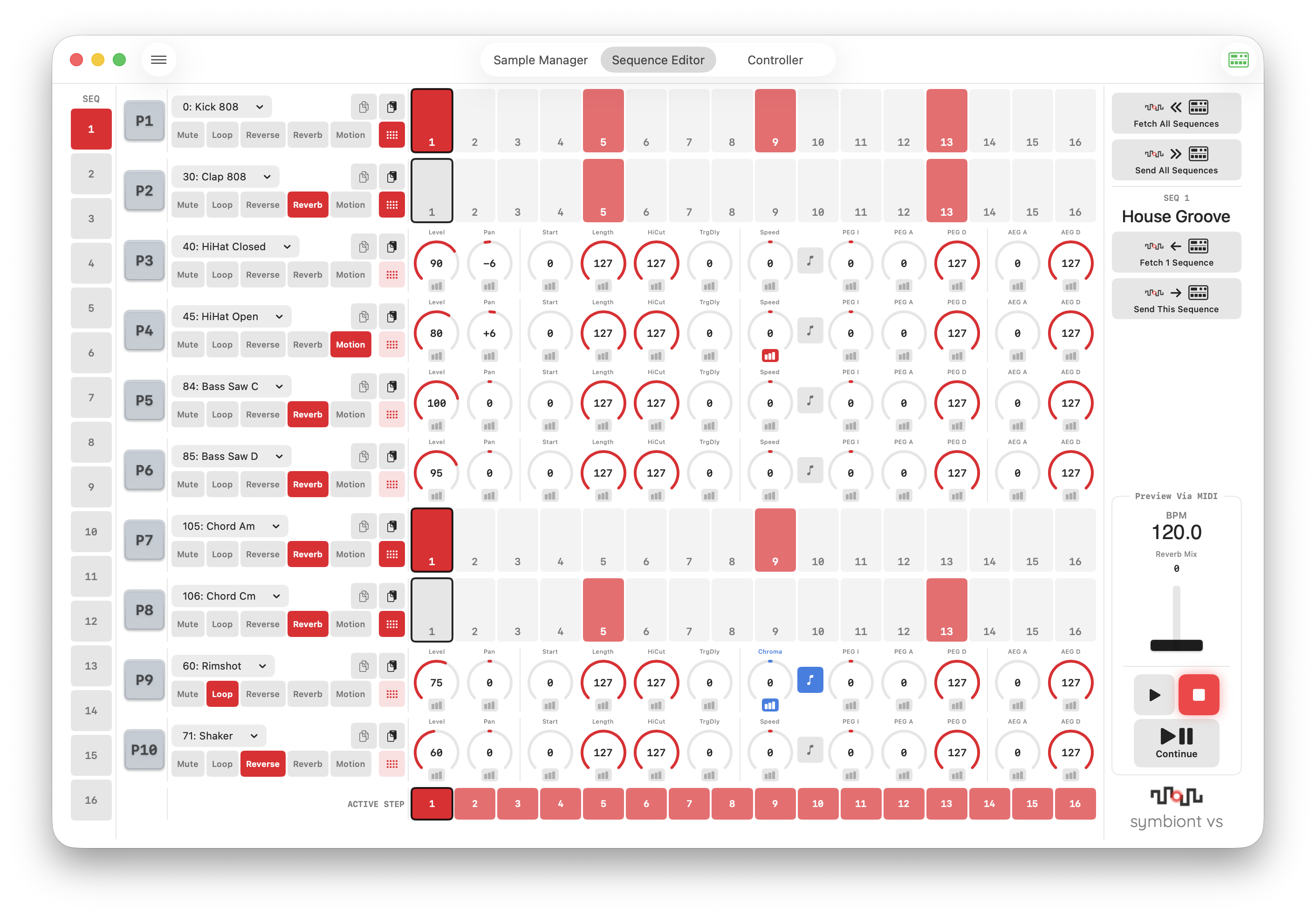
- 3-column layout: SEQ selection / Part editing / Operation panel
- 16 sequences × 10 parts — full coverage of the Volca Sample 2
- Parameter knobs: Level, Pan, Speed, PEG Intensity/Attack/Decay, AEG Attack/Decay, Start, Length, HiCut, Trigger Delay
- Speed / Chromatic Speed unified knob with mode toggle
- 16-step sequencer with Active Steps editing
- Preview via MIDI — real-time playback preview with motion
- File operations: Import / Export vlcspllib (volca sample Librarian format)
- Device transfer: Fetch / Send sequence data via SysEx
Part Controls
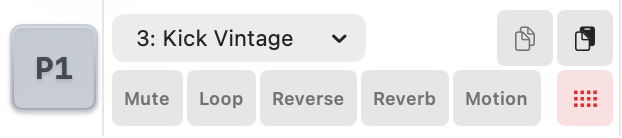
- Part number pad for triggering samples (keyboard keys 1–0 can trigger pads or switch sequences, configurable in Settings)
- Sample selector dropdown with name display (200 slots)
- Toggle buttons: Mute, Loop, Reverse, Reverb, Motion
- Steps button to switch between knob view and 16-step sequencer
- Part Copy & Paste — duplicate all parameters, step data, and motion data between parts
Motion Editor
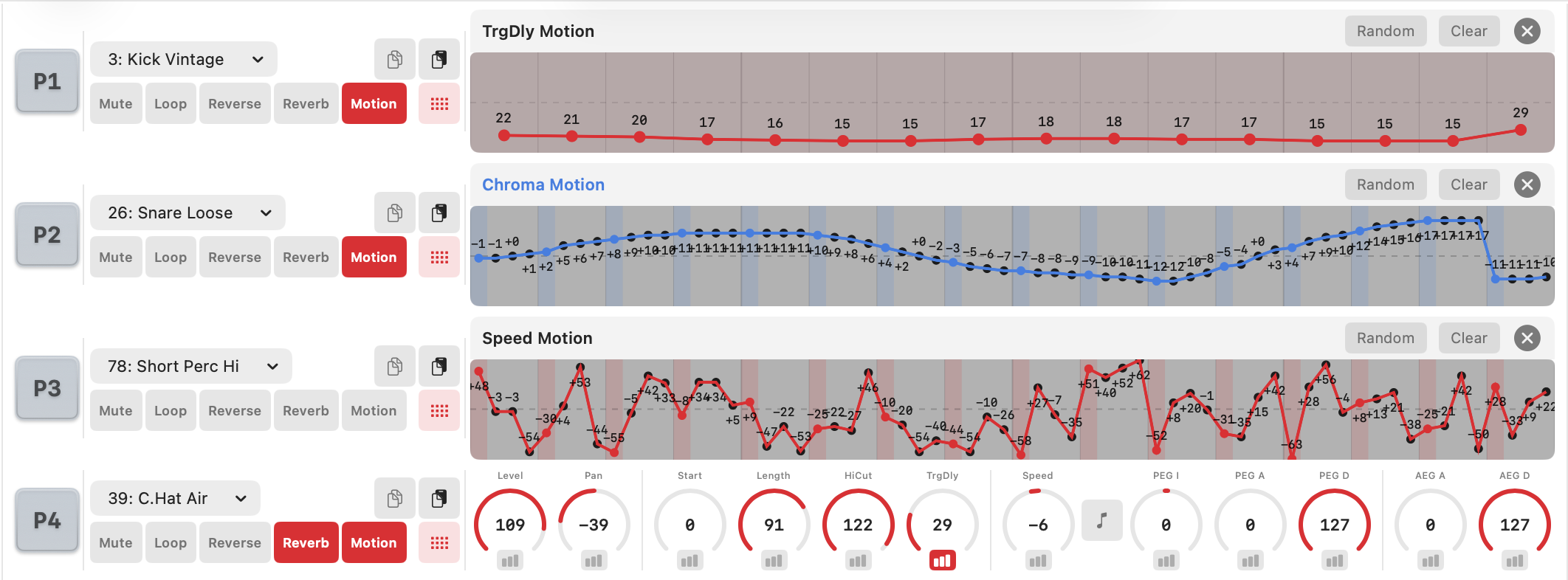
- Long-press any parameter knob (0.5 sec) to open the Motion Editor
- 64-point drawing for 11 parameters — drag to draw automation curves directly
- 4-point interpolation per step for smooth, expressive changes
- Speed Motion (red) / Chromatic Speed Motion (blue) with separate tracking
- Center-based parameters: Pan, Speed, and PEG Intensity display ± values from center
- Trigger Delay motion editor: 16 steps × 1 point for per-step timing control
- Clear button to reset motion data for the current parameter
- Real-time step position highlight during Preview via MIDI playback
Controller
A performance-ready layout with mixer faders, large trigger pads, mute/solo, and BPM control for live use.
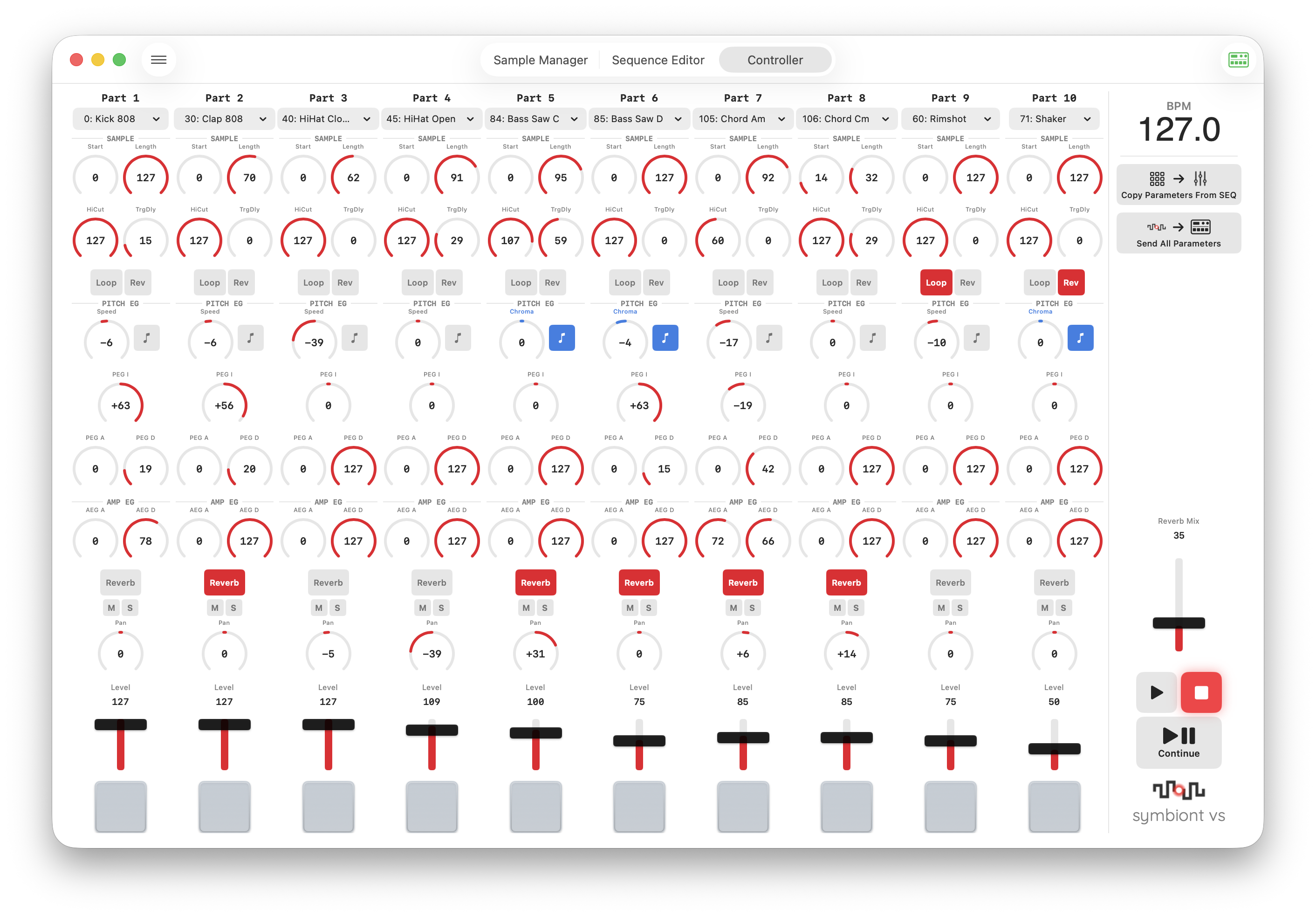
- 10-part vertical layout for quick overview and control
- Mixer faders for Level adjustment per part
- Large pads (72×72 px) for triggering samples, plus keyboard triggering with keys 1–0
- Mute / Solo per part for flexible live mixing
- BPM control with external clock sync support
- Load from SEQ / Send All Parameters to the device
- Transport controls: Play / Stop / Continue
MIDI Monitor
A dedicated MIDI monitor window for inspecting and debugging communication with your Volca Sample 2.
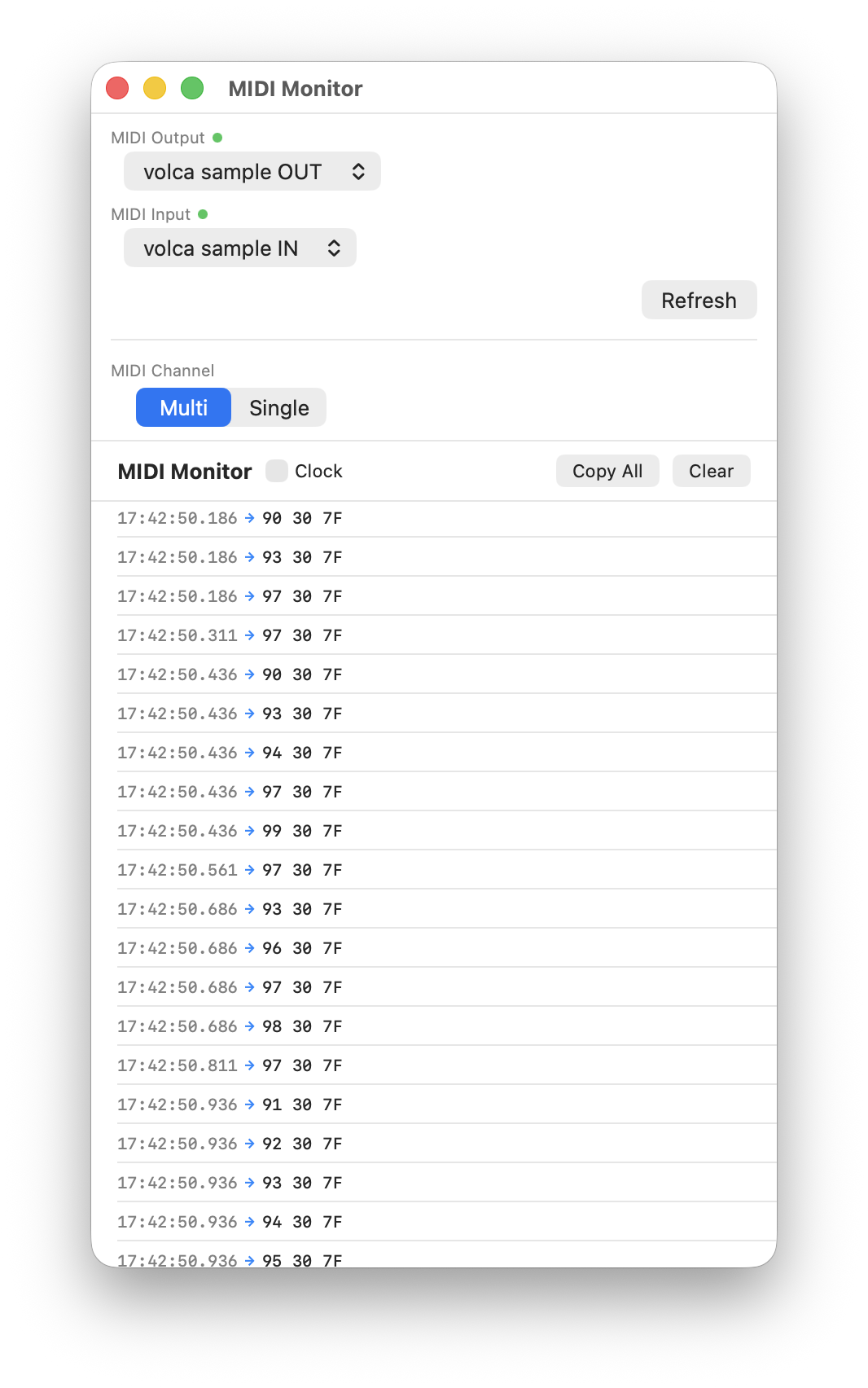
- Independent window — keep it open alongside other views
- Real-time message logging of all incoming and outgoing MIDI data
- Clock message filter to reduce noise and focus on relevant messages
- Multi / Single channel mode switching for targeted monitoring
Menus & Shortcuts
Comprehensive keyboard shortcuts and menu commands for fast, efficient workflows.
File Menu
| Command | Shortcut |
|---|---|
| New Data | ⌘ + N |
| Open | ⌘ + O |
| Save | ⌘ + S |
| Save As | ⌘ + ⇧ + S |
Edit Menu
| Command | Shortcut |
|---|---|
| Cut | ⌘ + X |
| Copy | ⌘ + C |
| Paste | ⌘ + V |
| Delete | Delete |
| Part Copy | — |
| Part Paste | — |
Transfer Menu
| Command | Description |
|---|---|
| Send All Data | Send all sequences and samples to the device |
| Fetch All Data | Fetch all sequences and samples from the device |
| Send All Sequence | Send all 16 sequences to the device |
| Fetch All Sequence | Fetch all 16 sequences from the device |
| Send Selected Sequence | Send the currently selected sequence to the device |
| Fetch Selected Sequence | Fetch the currently selected sequence from the device |
| Send All Sample | Send all samples to the device |
| Fetch All Sample | Fetch all samples from the device |
Keys 1–0
| Key | Controller | Sequence Editor |
|---|---|---|
| 1–0 | Trigger Parts 1–10 | Trigger Parts 1–10 or Switch to SEQ 1–10 |
In the Sequence Editor, the behavior of keys 1–0 can be switched between Pad Trigger and Sequence Switch via Settings (⌘ + ,). In the Controller, keys always trigger pads.
Settings
| Command | Shortcut |
|---|---|
| Settings | ⌘ + , |